How to use Streaks with AI assistants
Streaks for Mac can let an AI assistant on the same Mac read your habits, so you can ask things like "Which day of the week do I miss my habits most?". It uses MCP (the Model Context Protocol), which most assistants support.
What it can do
- Read only: tasks, history, notes and stats. It can't change anything.
- This Mac only: other computers, even on the same network, can't connect. It runs only while Streaks is open, and every request needs your access token.
- Most assistants send what they read to their own servers, so check your assistant's privacy settings.
Turn it on
- In Streaks on your Mac, go to Settings > MCP Server and click Turn On MCP Server.
- Under Connect an Assistant, choose your assistant and click Copy. The setup already has your address and token in it.
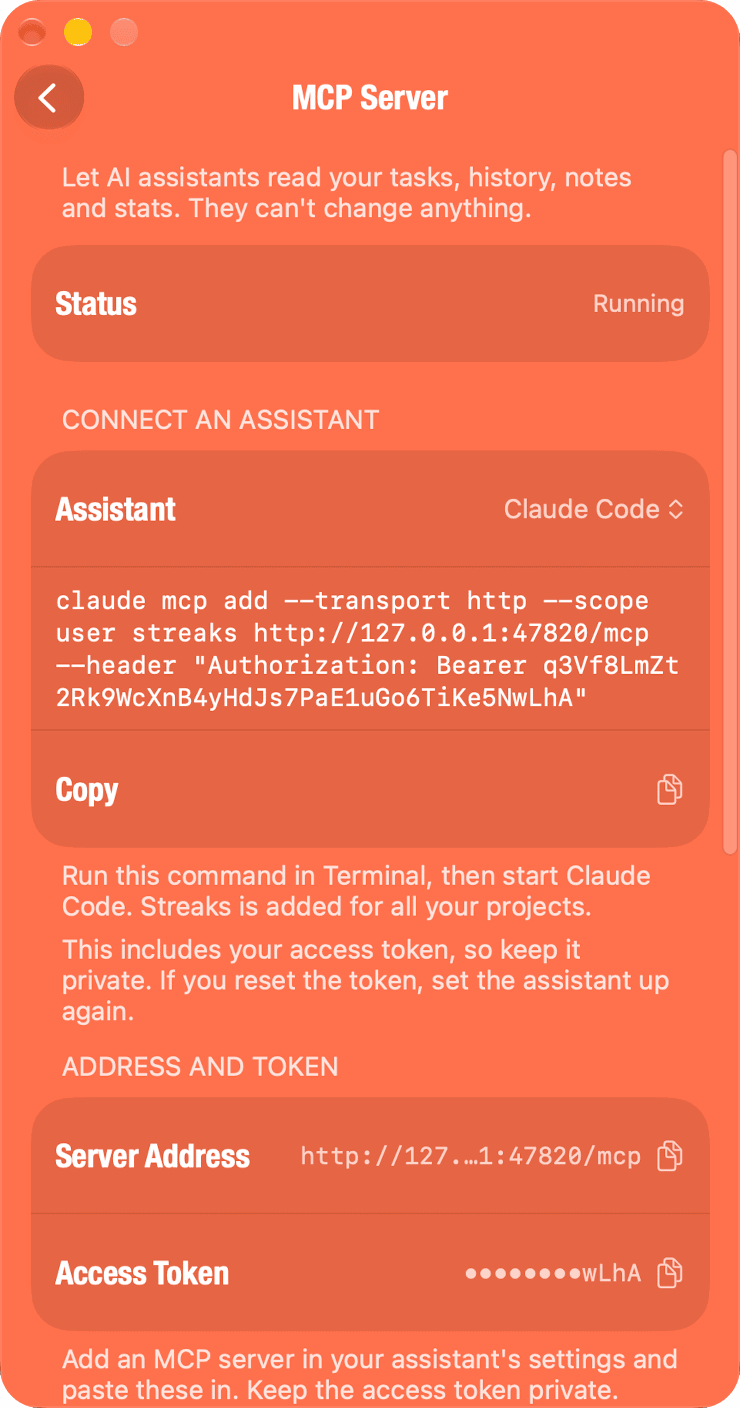
Setting up by hand? Replace <address> and <token> below with the Server Address and Access Token from that screen. Keep the token private.
Claude Code
Run in Terminal, then start Claude Code:
claude mcp add --transport http --scope user streaks <address> --header "Authorization: Bearer <token>"Codex
Add to ~/.codex/config.toml, then restart Codex:
[mcp_servers.streaks]
url = "<address>"
http_headers = { "Authorization" = "Bearer <token>" }
Gemini CLI
Run in Terminal, then start Gemini CLI:
gemini mcp add --scope user --transport http --header "Authorization: Bearer <token>" streaks <address>Claude Desktop
Claude Desktop connects through mcp-remote, which needs Node.js. Open Settings > Developer > Edit Config, add this, then restart Claude Desktop:
{
  "mcpServers": {
    "streaks": {
      "command": "npx",
      "args": ["-y", "mcp-remote", "<address>", "--header", "Authorization:${AUTH_HEADER}"],
      "env": { "AUTH_HEADER": "Bearer <token>" }
    }
  }
}
Cursor and other assistants
Most assistants read a configuration like this (in Cursor, ~/.cursor/mcp.json):
{
  "mcpServers": {
    "streaks": {
      "type": "http",
      "url": "<address>",
      "headers": { "Authorization": "Bearer <token>" }
    }
  }
}
In VS Code, run MCP: Open User Configuration and use the same, with "servers" in place of "mcpServers".
Things to ask
Mention Streaks the first time, so the assistant knows where to look.
What do I still have to do today in Streaks?
Three left for today: Read 20 Pages, Walk 8,000 Steps (5,240 so far, from Apple Health) and Floss.
Drink Water and Meditate are already done.
Which day of the week do I miss my habits most?
Saturday. Over the last 12 weeks you finished 61% of your tasks on Saturdays, compared with 88% on weekdays.
Most of the misses are Read 20 Pages and Floss, which you usually do in the evening.
How did my habits this month compare with last month?
Better overall: 84% of your tasks done in November, up from 76% in October.
Walk 8,000 Steps improved the most (25 days, up from 18). Meditate slipped, from 27 days to 21, mostly after the 15th.
How's my reading streak going this month?
Read 20 Pages is on a 19-day streak, your longest since July. You've done it 23 of 26 days in November.
The three misses were all Saturdays.
Summarise my Streaks notes from last week.
You left four notes. Two on Walk 8,000 Steps said the morning walks felt easier than evening ones, and one on Meditate said 10 minutes was too long on work days.
On Thursday you noted you'd read a whole chapter on the train.
Example answers. Yours come from your own tasks, and assistants can get things wrong, so check anything surprising in the app.
Privacy and troubleshooting
- Request History shows which tools were used and when, never what was asked or answered.
- Reset Access Token disconnects every assistant until you set it up again.
- Not connecting? Check Streaks is open and the status is Running, then restart the assistant. If the status says Couldn't Start, click Use a Different Port and set the assistant up again.
Related help
More guides
- Don't break the chain: the Seinfeld method, and why days off matter
- Switching habit trackers: how to bring your history across
Streaks is a habit tracker for iPhone, iPad, Apple Watch, Mac and Apple Vision Pro. A one-time purchase, with no subscription.